
- Basic routing firewall
- Basic NAT
- Typical workstation (separate IPv4 and IPv6)
- Typical workstation (combined IPv4 and IPv6)
- Stateful router example
- Installation
- Usage
- Simple firewall
- Configuration
- Tables
- Create table
- List tables
- List chains and rules in a table
- Delete table
- Flush table
- Create chain
- List rules
- Delete a chain
- Flush rules from a chain
- Add rule
- Deletion
- Sets
- Atomic reloading
- Examples
- Different rules for different interfaces
- Masquerading
- NAT with port forwarding
- Count new connections per IP
- Tips and tricks
- Simple stateful firewall
- Single machine
- Prevent brute-force attacks
- Logging traffic
- Troubleshooting
- Current status
- Use firewalld
- Reverting to legacy xtables
- Nftables in Debian the easy way
- What are the major differences?
- New syntax
- Текущий статус
- Новый синтаксис
- Предисловие (TL;DR)
- Первое правило nftables — никаких правил
- Синтаксис командной строки
- Порядок обработки правил
- Таблицы (tables)
- Цепочки (chains)
- Правила (rules)
- Множества (sets)
- Словари (maps)
- Словари действий (verdict maps)
- Условия отбора пакетов
- ▍ Payload expressions (отбор пакетов на основе содержимого)
- ▍ RAW payload expression (отбор на основе «сырых» данных)
- ▍ Метаусловия (meta expression)
- ▍ Conntrack (connection tracking system)
Basic routing firewall
- Only allows packets from LAN to the firewall machine
- Only allows packets
From LAN to WANFrom WAN to LAN for connections established by LAN. - From LAN to WAN
- From WAN to LAN for connections established by LAN.
For forwarding between WAN and LAN to work, it needs to be enabled with:
root #sysctl -w net. ipv4. ip_forward = 1
Basic NAT
Notemasquerade is available in kernel 3. 18 and up. When using NAT on kernels before 4. 18, be sure to unload or disable iptables NAT, as it will take precedence over nftables NAT.
Typical workstation (separate IPv4 and IPv6)
While counter is used in this example, it isn’t required if you’re not interested in packet counts. Just omit counter from any rule.
FILE /etc/nftables/nftables. rules
Typical workstation (combined IPv4 and IPv6)
As for the previous example, but uses the inet family to apply rules to both IPv4 and IPv6 packets. So, only one table needs to be maintained.
Stateful router example
NoteShell scripts break atomicity when applying the ruleset unless using nftables native scripting environment. See Nftables Scripting.
Installation
This article or section needs expansion.
Usage
nftables makes no distinction between temporary rules made in the command line and permanent ones loaded from or saved to a file.
All rules have to be created or loaded using nft command line utility.
Refer to #Configuration section on how to use.
Current ruleset can be printed with:
# nft list ruleset
Simple firewall
nftables comes with a simple and secure firewall configuration stored in the /etc/nftables. conf file.
The nftables. service will load rules from that file when started or enabled.
Configuration
To read input from a file use the -f/—file option:
# nft —file filename
Note that any rules already loaded are not automatically flushed.
See nft(8) for a complete list of all commands.
Tables
nftables familyiptables utility
ipiptables
ip6ip6tables
inetiptables and ip6tables
arparptables
bridgeebtables
ip (i. IPv4) is the default family and will be used if family is not specified.
To create one rule that applies to both IPv4 and IPv6, use inet. inet allows for the unification of the ip and ip6 families to make defining rules for both easier.
See nft(8) § ADDRESS FAMILIES for a complete description of address families.
Create table
# nft add table family_type table_name
List tables
To list all tables:
# nft list tables
List chains and rules in a table
To list all chains and rules of a specified table do:
# nft list table family_type table_name
For example, to list all the rules of the my_table table of the inet family:
# nft list table inet my_table
Delete table
To delete a table do:
# nft delete table family_type table_name
This will destroy all chains in the table.
Flush table
To flush all rules from a table do:
# nft flush table family_type table_name
The purpose of chains is to hold #Rules. Unlike chains in iptables, there are no built-in chains in nftables. This means that if no chain uses any types or hooks in the netfilter framework, packets that would flow through those chains will not be touched by nftables, unlike iptables.
Chains have two types. A base chain is an entry point for packets from the networking stack, where a hook value is specified. A regular chain may be used as a jump target for better organization.
Create chain
To add a base chain specify hook and priority values:
chain_type can be filter, route, or nat.
For IPv4/IPv6/Inet address families hook_type can be prerouting, input, forward, output, or postrouting. See nft(8) § ADDRESS FAMILIES for a list of hooks for other families.
For example, to add a base chain that filters input packets:
Replace add with create in any of the above to add a new chain but return an error if the chain already exists.
Regular chain
# nft add chain family_type table_name chain_name
For example, to add a regular chain named my_tcp_chain to the my_table table of the inet address family do:
# nft add chain inet my_table my_tcp_chain
List rules
# nft list chain family_type table_name chain_name
# nft list chain inet my_table my_output
To edit a chain, simply call it by its name and define the rules you want to change.
For example, to change the my_input chain policy of the default table from accept to drop
Delete a chain
To delete a chain do:
# nft delete chain family_type table_name chain_name
The chain must not contain any rules or be a jump target.
Flush rules from a chain
To flush rules from a chain do:
# nft flush chain family_type table_name chain_name
Rules are either constructed from expressions or statements and are contained within chains.
Add rule
Tip: The iptables-translate utility translates iptables rules to nftables format.
To add a rule to a chain do:
# nft add rule family_type table_name chain_name handle handle_value statement
The rule is appended at handle_value, which is optional. If not specified, the rule is appended to the end of the chain.
The —handle switch, which can be added to any valid list command, must be used to determine a rule handle. This switch tells nft to list the handles in its output. The —numeric argument is useful for viewing some numeric output, like unresolved IP addresses.
# nft —handle —numeric list chain inet my_table my_input
To prepend the rule to the position do:
# nft insert rule family_type table_name chain_name handle handle_value statement
If handle_value is not specified, the rule is prepended to the chain.
Expressions
There are various expressions available in nftables and, for the most part, coincide with their iptables counterparts. The most noticeable difference is that there are no generic or implicit matches. A generic match was one that was always available, such as —protocol or —source. Implicit matches were protocol-specific, such as —sport when a packet was determined to be TCP.
- meta (meta properties, e.g. interfaces)
- icmp (ICMP protocol)
- icmpv6 (ICMPv6 protocol)
- ip (IP protocol)
- ip6 (IPv6 protocol)
- tcp (TCP protocol)
- udp (UDP protocol)
- sctp (SCTP protocol)
- ct (connection tracking)
Deletion
Individual rules can only be deleted by their handles. Obtaining the handles was shown at #Add rule. Assuming
deletes it.
All the chains in a table can be flushed with the nft flush table command. Individual chains can be flushed using either the nft flush chain or nft delete rule commands.
# nft flush table table_name
# nft flush chain family_type table_name chain_name
# nft delete rule family_type table_name chain_name
The first command flushes all of the chains in the ip table_name table. The second flushes the chain_name chain in the family_type table_name table. The third deletes all of the rules in chain_name chain in the family_type table_name table.
Sets
To add or delete elements from the set, use:
Atomic reloading
Flush the current ruleset:
Dump the current ruleset:
Now you can edit /tmp/nftables and apply your changes with:
# nft -f /tmp/nftables
Examples
When using jumps in configuration file, it is necessary to define the target chain first. Otherwise one could end up with Error: Could not process rule: No such file or directory.
Different rules for different interfaces
If your box has more than one network interface, and you would like to use different rules for different interfaces, you may want to use a «dispatching» filter chain, and then interface-specific filter chains. For example, let us assume your box acts as a home router, you want to run a web server accessible over the LAN (interface enp3s0), but not from the public internet (interface enp2s0), you may want to consider a structure like this:
Alternatively you could choose only one iifname statement, such as for the single upstream interface, and put the default rules for all other interfaces in one place, instead of dispatching for each interface.
Masquerading
nftables has a special keyword masquerade «where the source address is automagically set to the address of the output interface» (source). This is particularly useful for situations in which the IP address of the interface is unpredictable or unstable, such as the upstream interface of routers connecting to many ISPs. Without it, the Network Address Translation rules would have to be updated every time the IP address of the interface changed.
To use it:
- make sure masquerading is enabled in the kernel (true if you use the default kernel), otherwise during kernel configuration, set CONFIG_NFT_MASQ=m.
- the masquerade keyword can only be used in chains of type nat.
- masquerading is a kind of source NAT, so only works in the output path.
Example for a machine with two interfaces: LAN connected to enp3s0, and public internet connected to enp2s0:
Since the table type is inet both IPv4 and IPv6 packets will be masqueraded. If you want only ipv4 packets to be masqueraded (since extra adress space of IPv6 makes NAT not required) meta nfproto ipv4 expression can be used infront of oifname «enp2s0» masquerade or the table type can be changed to ip.
NAT with port forwarding
The factual accuracy of this article or section is disputed.
Reason: I think my_postrouting chain will cause the destination computer see that connections are made by router rather than from some global IP. Also this does not masquerade outbound traffic. (Discuss in Talk:Nftables)
This example will forward ports 22 and 80 to destination_ip. You will need to set net. ipv4. ip_forward and net. ipv4. conf. wan_interface. forwarding to 1 via sysctl.
Count new connections per IP
To print the blackholed IPs, run nft list set inet dev blackhole.
Tips and tricks
The output of nft list ruleset command is a valid input file for it as well. Current rule set can be saved to file and later loaded back in.
Note: nft list does not output variable definitions, if you had any in your original file they will be lost. Any variables used in rules will be replaced by their value.
Simple stateful firewall
Reason: This is not a very simple firewall. I would consider what Arch Linux ships in /etc/nftables. conf simple. Recommend replacing this section with that script and give some directions on how to expand it for specific needs. (Discuss in Talk:Nftables)
Single machine
# nft flush ruleset
Add a table:
# nft add table inet my_table
Add the input, forward, and output base chains. The policy for input and forward will be to drop. The policy for output will be to accept.
Add two regular chains that will be associated with tcp and udp:
# nft add chain inet my_table my_tcp_chain
# nft add chain inet my_table my_udp_chain
Related and established traffic will be accepted:
# nft add rule inet my_table my_input ct state related,established accept
All loopback interface traffic will be accepted:
# nft add rule inet my_table my_input iif lo accept
Drop any invalid traffic:
# nft add rule inet my_table my_input ct state invalid drop
Accept ICMP and IGMP:
# nft add rule inet my_table my_input meta l4proto ipv6-icmp accept
# nft add rule inet my_table my_input meta l4proto icmp accept
# nft add rule inet my_table my_input ip protocol igmp accept
New udp traffic will jump to the UDP chain:
# nft add rule inet my_table my_input meta l4proto udp ct state new jump my_udp_chain
New tcp traffic will jump to the TCP chain:
Reject all traffic that was not processed by other rules:
# nft add rule inet my_table my_input meta l4proto udp reject
# nft add rule inet my_table my_input meta l4proto tcp reject with tcp reset
# nft add rule inet my_table my_input counter reject with icmpx port-unreachable
At this point you should decide what ports you want to open to incoming connections, which are handled by the TCP and UDP chains. For example to open connections for a web server add:
# nft add rule inet my_table my_tcp_chain tcp dport 80 accept
# nft add rule inet my_table my_tcp_chain tcp dport 443 accept
To accept SSH traffic on port 22:
# nft add rule inet my_table my_tcp_chain tcp dport 22 accept
To accept incoming DNS requests:
# nft add rule inet my_table my_tcp_chain tcp dport 53 accept
# nft add rule inet my_table my_udp_chain udp dport 53 accept
Be sure to make your changes permanent when satisifed.
Prevent brute-force attacks
Sshguard is program that can detect brute-force attacks and modify firewalls based on IP addresses it temporarily blacklists. See Sshguard#nftables on how to set up nftables to be used with it.
Logging traffic
You can log packets using the log action. The most simple rule to log all incoming traffic is:
# nft add rule inet filter input log
See nftables wiki for details.
Troubleshooting
Using nftables can interfere with Docker networking (and probably other container runtimes as well). You can find various workarounds on the internet which either involve patching iptables rules and ensuring a defined service start order or disabling dockers iptables management completely which makes using docker very restrictive (think port forwarding or docker-compose).
A reliable method is letting docker run in a separate network namespace where it can do whatever it wants. It is probably best to not use iptables-nft to prevent docker from mixing nftables and iptables rules.
/etc/systemd/system/docker. service. d/netns. conf
Adjust the 10. * IP addresses if they are not appropriate for your setup.
iifname docker0 oifname eth0 masquerade
Then, ensure that kernel IP forwarding is enabled.
Now you can setup a firewall and port forwarding for the docker0 interface using nftables without any interference.
Current status
NOTE: Debian 10 Buster and later use the nftables framework by default.
Starting with Debian 10 Buster, nf_tables is the default backend when using iptables, by means of the iptables-nft layer (i. e, using iptables syntax with the nf_tables kernel subsystem). This also affects ip6tables, arptables and ebtables.
Use firewalld
The firewalld software takes control of all the firewalling setup in your system, so you don’t have to know all the details of what is happening in the underground. There are many other system components that can integrate with firewalld, like NetworkManager, libvirt, podman, fail2ban, docker, etc.
Reverting to legacy xtables
You can switch back and forth between iptables-nft and iptables-legacy by means of update-alternatives (same applies to arptables and ebtables).
The default starting with Debian 10 Buster:
# update-alternatives —set iptables /usr/sbin/iptables-nft
# update-alternatives —set ip6tables /usr/sbin/ip6tables-nft
# update-alternatives —set arptables /usr/sbin/arptables-nft
# update-alternatives —set ebtables /usr/sbin/ebtables-nft
Switching to the legacy version:
# update-alternatives —set iptables /usr/sbin/iptables-legacy
# update-alternatives —set ip6tables /usr/sbin/ip6tables-legacy
# update-alternatives —set arptables /usr/sbin/arptables-legacy
# update-alternatives —set ebtables /usr/sbin/ebtables-legacy
Nftables in Debian the easy way
# aptitude install nftables
# systemctl enable nftables. service
This way, nftables is active at boot. By default, rules are located in /etc/nftables. conf.
To stop nftables from doing anything, just drop all the rules:
To prevent nftables from starting at boot:
# systemctl mask nftables. service
To uninstall it and purge any traces of nftables in your system:
# aptitude purge nftables
What are the major differences?
In iptables there are several tables (filter, nat) and chains (FORWARD, INPUT. ) by default. In nftables, there are no default tables/chains.
Also, in iptables you only have one target per rule (-j ACCEPT, -j LOG. In nftables, you can perform several actions in one single rule.
nftables includes built-in data sets capabilities. In iptables this is not possible, and there is a separated tool: ?ipset.
In the iptables framework there are tools per family: iptables, ip6tables, arptables, ebtables. Now, nftables allows you to manage all families in one single CLI tool.
This new framework features a new linux kernel subsystem, known as nf_tables. The new engine mechanism is inspired by BPF-like systems, with a set of basic expressions, which can be combined to build complex filtering rules.
New syntax
Create a basic IPv4/IPv6 dual-stack table:
# nft add table inet filter
Create a chain for input IPv4/IPv6 dual-stack traffic:
A rule to check that all is fine (IPv4/IPv6 dual-stack):
# nft add rule inet filter input counter accept
Show all the previous:
# nft list table inet filter
Flush rules in chain filter/input:
# nft flush chain inet filter input
Delete the chain filter/input:
# nft delete chain inet filter input
Delete the table filter:
# nft delete table inet filter
The family parameter is optional. The default is ‘ip’. Other families are ‘inet’, ‘ip6’, ‘arp’, ‘bridge’ or ‘netdev’:
# nft add table ip6 filter
# nft add chain ip6 filter input
# nft add rule ip6 filter input counter accept
Debian ships example configurations in:
Count traffic on destination port tcp/22 (IPv4/IPv6 dual-stack):
# nft add rule inet filter input tcp dport 22 counter
Count and accept traffic in 80/tcp and 443/tcp in new and established state (IPv4/IPv6 dual-stack):
Текущий статус
Примечание: Debian Buster использует фреймворк nftables по умолчанию.
Начиная с Debian Buster, nf_tables бэкэнд по умолчанию для iptables, посредством уровня iptables-nft (т. используя синтаксис iptables с подсистемой ядра nf_tables). Это также влияет на ip6tables, arptables и ebtables.
Вы можете переключаться между iptables-nft и iptables-legacy с помощью update-alternatives (то же самое относится и к arptables и ebtables).
По умолчанию, начинается с Debian Buster:
Переключение на устаревшие версии:
Если вы хотите включить фаервол по умолчанию в Debian, выполните следующие команды:
# apt install nftables
# systemctl enable nftables. service
После чего, nftables будет включаться при загрузке. По умолчанию, правила находятся в /etc/nftables. conf.
Чтобы спросить все правила в nftables, и остановить фильтрацию:
Чтобы предотвратить запуск nftables при загрузке:
Чтобы удалить пакет nftables и все его следы в системе:
# apt purge nftables
Вам следует рассмотреть возможность использования оболочки вместо написания собственных сценариев брандмауэра. Рекомендуется запустить ?firewalld, который довольно хорошо интегрируется в систему.
Новый синтаксис
Создать базовую таблицу IPv4:
Создать цепочку для исходящего трафика IPv4:
Правило, для подсчета входящих пакетов (IPv4):
Показать результат предыдущих команд:
Сбросить правила для цепочки filter/input:
Удалить цепочки filter/input:
Удалить таблицу filter:
Семейство не обязательных параметров. По умолчанию используется ‘ip’:
Директория с примерами конфигураций в Debian:
Подсчет входящего трафика на порт tcp/22:
Подсчет и прием трафика на 80/tcp и 443/tcp для новых и существующих соединений:
Предисловие (TL;DR)
Для облегчения перехода можно конвертировать правила iptables в nftables с помощью утилит iptables-translate, iptables-restore-translate, iptables-nft-restore и т. Утилиты находятся в пакете iptables, который нужно установить дополнительно.
После чего возьмём какую-нибудь команду и пропустим её через iptables-translate. Например, из такой команды:
iptables -A INPUT -i eth0 -p tcp —dport 80 -j DROP
получится вот такая:
nft add rule ip filter INPUT iifname «eth0» tcp dport 80 counter drop
А вот почему она не работает — об этом вы узнаете
в следующей серии
Первое правило nftables — никаких правил
В nftables нет обязательных предопределённых таблиц, как в iptables. Вы сами создаёте нужные вам таблицы. И называете их, как хотите.
Вероятно, самое заметное отличие nftables от iptables — наличие иерархической структуры: правила группируются в цепочки, цепочки группируются в таблицы. Внешне это всё слегка напоминает JSON. И неудивительно, что экспорт в JSON имеется (команда nft -j list ruleset).
Конечно, в iptables тоже есть таблицы и цепочки, но они не выделяются настолько явно. Посмотрите, как выглядит файл конфигурации nftables:
Действующие правила показываются в таком же формате. Чтобы их увидеть, используется команда nft list ruleset. И эта же команда позволяет сохранить правила в файл:
Впоследствии правила можно загрузить:
# nft -f /etc/nftables. conf
Внимание! Загружаемые из файла правила добавляются к уже работающим, а не заменяют их полностью. Чтобы начать «с чистого листа», первой строкой файла вписывают команду полной очистки (flush ruleset).
Можно также хранить правила в разных файлах, собирая их вместе с помощью include. И как вы заметили — можно использовать define.
Синтаксис командной строки
Конечно, вводить многострочные конструкции в командной строке неудобно. Поэтому для управления файерволом используется обычный синтаксис примерно такого вида:
Допустим, нужно заблокировать доступ к ssh и telnet. Для этого используем такую команду:
Как видите, она состоит из простых, понятных частей:
вставить (insert) правило (rule) в семейство таблиц inet, таблицу filter, цепочку input;
запретить (drop) прохождение пакетов, вошедших через интерфейс (iif) eth0, имеющих тип протокола tcp и направляющихся к сервисам ssh или telnet
Примечание: номера портов для сервисов берутся из файла /etc/services
Теперь, чтобы удалить это правило, на него как-то нужно сослаться. Для этого существуют хэндлы (handle), которые можно увидеть, добавив опцию «a» в команду просмотра правил. Кстати, необязательно смотреть все правила (nft -a list ruleset). Можно глянуть только нужную таблицу или цепочку:
# nft -a list chain ip filter input
Соответственно, удаление правила выглядит так:
Учтите: в каждой таблице своя нумерация хэндлов, не зависящая от других таблиц. Если сейчас добавить ещё одну таблицу — у неё будут свои handle 1, handle 2 и т. Благодаря этому, сделанные в какой-либо таблице изменения не влияют на нумерацию в других таблицах.
Порядок обработки правил
Если таблицы и цепочки мы добавляем сами — как файервол поймёт, в каком порядке применять правила? Очень просто: он обрабатывает пакеты с учётом семейства таблиц и хуков цепочек. Вот как на этой картинке:
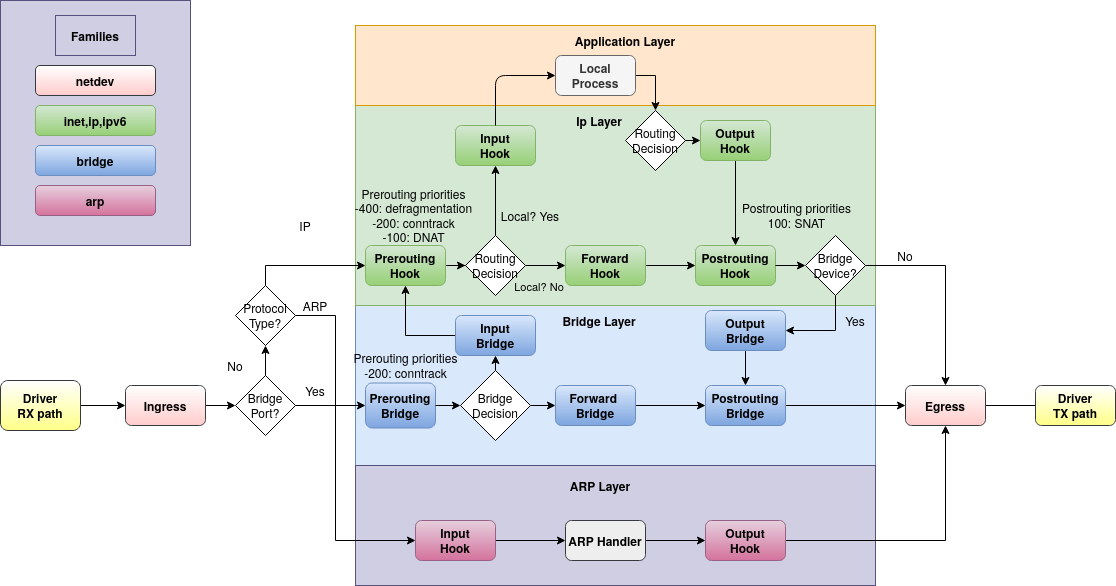
Таблицы могут быть одного из 6-ти семейств (families):
ip — для обработки пакетов IPv4
ip6 — IPv6
inet — обрабатывает сразу и IPv4 и IPv6 (чтобы не дублировать одинаковые правила)
arp — пакеты протокола ARP
bridge — пакеты, проходящие через мост
netdev — для обработки «сырых» данных, поступающих из сетевого интерфейса (или передающихся в него)
Цепочки получают на вход пакеты из хуков (цветные прямоугольники на картинке). Для ip/ip6/inet предусмотрены хуки prerouting, input, forward, output и postrouting.
У цепочки есть приоритет. Чем он ниже (может быть отрицательным), тем раньше обрабатывается цепочка. Обратите внимание на хук prerouting в зелёной части картинки — там это видно.
Чтобы не запоминать числа, для указания приоритета можно использовать зарезервированные слова. Самые используемые – dstnat (приоритет = -100), filter (0), srcnat (100).
Теперь рассмотрим основные части nftables подробнее.
Таблицы (tables)
Поскольку таблиц изначально нет, их нужно создать до того, как создавать цепочки и правила. Именно поэтому не сработало правило после iptables-translate — для него не нашлось таблицы и цепочки.
По умолчанию (если не указана family) считается, что таблица относится к семейству ip. У таблицы может быть единственный флаг — dormant, который позволяет временно отключить таблицу (вместе во всем её содержимым):
# nft add table filter
Примечание: если команда вводится в командной строке — нужно ставить бэкслэш перед точкой с запятой.
Цепочки (chains)
Цепочки бывают базовые (base) и обычные (regular). Базовая цепочка получает пакеты из хука, с которым она связана. А обычная цепочка — это просто контейнер для группировки правил. Чтобы сработали её правила, нужно выполнить на неё явный переход.
Пример в начале статьи содержит обычные цепочки input_wan и input_lan, а также базовые цепочки input, forward и postrouting.
Для базовой цепочки кроме хука и приоритета нужно указать тип:
- filter — стандартный тип, может применяться в любом семействе для любого хука
- nat — используется для NAT. В цепочке обрабатывается только первый пакет соединения, все остальные отправляются «по натоптанной дорожке» через conntrack
- route — применяется в хуке output для маркировки пакетов
Также можно указать policy (действие по умолчанию). , что делать с пакетами, добравшимися до конца цепочки — drop или accept. Если не указано — подразумевается accept.
Пример добавления цепочки:
Переход на обычную цепочку может выполняться одной из двух команд — jump или goto. Отличие состоит в поведении после возврата из обычной цепочки. После jump продолжается обработка пакетов по всей цепочке, после goto сразу срабатывает действие по умолчанию.
Пакет, для которого в handle 3 сработало условие, пойдёт на обработку в цепочку other-chain, а после возврата из неё — продолжит обрабатываться в правиле handle 4.
Если вместо jump будет использовано goto — после возврата из other-chain сработает действие по умолчанию (в этом примере — policy accept).
Из вызванной цепочки можно выйти досрочно с помощью действия return. При этом вызывающая цепочка продолжит выполняться со следующего правила (аналогично jump). Использование return в базовой цепочке вызывает срабатывание действия по умолчанию.
Правила (rules)
Правила можно добавлять и вставлять не только по хэндлу, но и по индексу («вставить перед 5-м правилом»). Правило, на которое ссылается index, должно существовать (то есть, в пустую цепочку вставить по индексу не получится).
Правила можно комментировать:
Заодно здесь показано, как можно использовать интервалы. Для адресов они тоже работают: 192. 168. 15-192. 168. Их также можно применять в множествах, словарях и т. (с флагом interval для именованных).
Множества (sets)
Множества бывают двух типов — анонимные и именованные. Анонимные — пишутся в фигурных скобках прямо в строке с правилом:
Такое множество можно изменить, только изменив правило целиком.
А вот именованные множества можно менять независимо от правил:
Возможные типы элементов у множеств: ipv4_addr, ipv6_addr, ether_addr, inet_proto, inet_service, mark, ifname.
Элементы можно добавлять сразу при объявлении множества:
Также здесь можно увидеть, как указать собственный таймаут для каждого элемента.
Если множество сохранено в файле, для объявления элементов можно использовать define:
Флаги во множествах бывают такие: constant, dynamic, interval, timeout. Можно указывать несколько флагов через запятую.
Если указать timeout — элемент будет находиться во множестве заданное время, после чего автоматически удалится.
Флаг dynamic используется, если элементы формируются на основе информации из проходящих пакетов (packet path).
Можете поэкспериментировать и посмотреть, как оно работает. Для этого удобно использовать ICMP и пинговать целевой компьютер с соседней машины. Допустим, возьмём вот такую комбинацию:
Здесь при приходе первого же пакета icmp в множество ping_set будет добавлен элемент, описанный в фигурных скобках. А когда у элемента сработает условие «rate over 5/minute» (превышена скорость 5 пакетов в минуту) — выполнится описанное в правиле действие (drop). В развёрнутом виде это выглядит так:
На первый взгляд кажется, что пройдёт 5 пингов, и всё остановится. Затем на 30-й секунде элемент удалится, и опять всё пойдёт по новой. Однако, алгоритм ограничения скорости (здесь используется «token bucket») работает по-другому.
Получается вот такое пингование (смотрите на icmp_seq):
PING 192. 168. 201 (192. 168. 201) 56(84) bytes of data. 64 bytes from 192. 168. 201: icmp_seq=1 ttl=64 time=0. 568 ms
64 bytes from 192. 168. 201: icmp_seq=2 ttl=64 time=0. 328 ms
64 bytes from 192. 168. 201: icmp_seq=3 ttl=64 time=0. 367 ms
64 bytes from 192. 168. 201: icmp_seq=4 ttl=64 time=0. 456 ms
64 bytes from 192. 168. 201: icmp_seq=5 ttl=64 time=0. 319 ms
64 bytes from 192. 168. 201: icmp_seq=13 ttl=64 time=0. 369 ms
64 bytes from 192. 168. 201: icmp_seq=25 ttl=64 time=0. 339 ms
На 30-й секунде элемент удаляется, и цикл повторяется — 31,32,33,34,35,43,55.
То есть, первые 5 пингов проскакивают без задержки, затем срабатывает ограничение rate over 5/minute и пакеты начинают отбрасываться. Но через 12 секунд (1 минута / 5 = 12с) первый прошедший пакет удалится из виртуальной «корзины с токенами» и освободит место для прохода следующего пакета. И через 12 секунд — ещё один.
Разумеется, блокировка ICMP мало кому интересна. Обычно это используется для защиты ssh. Прямо в документации есть такой пример:
Здесь сделан интересный «финт ушами», который заключается в том, что сделано два множества с разными таймаутами. Первое детектирует превышение скорости пакетов, а действием у него назначено добавление элемента во второе множество, которое и используется непосредственно для блокировки.
Хотя, на мой взгляд, вместо add для blackhole лучше использовать update. Разница в том, что update при каждом вызове перезапускает таймаут элемента. Таким образом, блокировка будет действовать непрерывно, пока первое множество будет детектировать флуд и обновлять таймауты второго множества. А в примере из документации блокировка каждую минуту ненадолго снимается.
Словари (maps)
Словари похожи на множества, только хранят пары ключ-значение. Бывают анонимными и именованными. Анонимный:
И, разумеется, элементы именованных словарей можно добавлять и удалять.
Словари действий (verdict maps)
Это вариант словарей, где в качестве значения используется действие (verdict). Действие может быть таким: accept, drop, queue, continue, return, jump, goto.
Пример правила c анонимным verdict map:
Пример с именованным:
Обратите внимание: в правиле перед ключевым словом vmap нужно указать, что будет использоваться в качестве ключа (здесь — ip saddr). Этот ключ должен иметь тип значения, совпадающий с указанным в определении словаря (в этом примере — type ipv4_addr). Для ipv4_addr в качестве ключей могут быть ip saddr, ip daddr, arp saddr ip, ct original ip daddr и пр. Все возможные варианты описаны вот здесь.
Условия отбора пакетов
Позволяют использовать несколько условий одновременно (логическое И):
Правило сработает, если ip saddr == 1. 1 И ip daddr == 2. 2 И ip protocol == tcp
Конкатенации можно применять в словарях:
И в verdict maps:
▍ Payload expressions (отбор пакетов на основе содержимого)
Это те условия, которые отбирают пакеты на основе информации, содержащейся в самих пакетах. Например, порт назначения, адрес источника, тип протокола и т.
Условий очень много, поэтому я приведу только их список. Впрочем, во многих случаях их назначение понятно из названия. Если нет — всегда можно посмотреть в документации.
▍ RAW payload expression (отбор на основе «сырых» данных)
Это условие, которое выбирает из пакета указанное количество бит, начиная с заданного смещения. Бывает полезным, если нужно сопоставить данные, для которых ещё нет готового шаблона. у пакетов разных протоколов по заданному смещению находятся разные данные, сначала нужно отобрать подходящие пакеты (в примере ниже — с помощью meta l4proto).
Синтаксис выглядит так:
Например, выберем пакеты протоколов TCP и UDP, идущие на заданные порты:
впрочем, для этих протоколов есть готовые шаблоны, так что писать можно проще:
Поскольку TCP и UDP – протоколы транспортного уровня, в качестве base здесь используется заголовок транспортного уровня (transport header => th).
Для протоколов сетевого уровня (например, IPv4 и IPv6) используются заголовки сетевого уровня (network header => nh).
А Ethernet, PPP и PPPoE – это канальный уровень. Для них применяется ll (т. link layer).
▍ Метаусловия (meta expression)
Метаусловия позволяют фильтровать пакеты на основе метаданных. То есть, на основе таких данных, которые не содержатся в самом пакете, но каким-либо образом с ним связаны — порт, через который вошёл пакет; номер процессора, обрабатывающего пакет; UID исходного сокета и прочее. Метаусловия бывают двух типов. У одних ключевое слово meta обязательно, у других — нет:
▍ Conntrack (connection tracking system)
Система conntrack хранит множество метаданных, по которым можно отбирать пакеты. Соответствующее условие выглядит таким образом:
Вероятно, наиболее используемое условие при работе с conntrack — ct state. Которое может иметь значения new, established, related, invalid, untracked.
Остальные возможности conntrack используются гораздо реже. Даже не буду их описывать. А вот несколько примеров c conntrack лишними не будут.
Разрешить не более 10 соединений с портом tcp/22 (ssh):
Следующее правило разрешает только 20 соединений с каждого адреса. Для каждого адреса IPv4 во множестве my_connlimit будет создан элемент со счётчиком. Когда счётчик достигнет нуля — элемент удалится, поэтому флаг timeout здесь не нужен.